
Managing a modern school involves much more than teaching lessons and maintaining attendance registers. School administrators must handle admissions, student records, fee collection, examinations, timetables, teacher information, parent communication, transport, reports, and compliance.
When these activities depend on paper files, disconnected spreadsheets, and informal messaging groups, even a well-run school can lose time and accuracy.
This is where Mentor Quill school management software in Pakistan can make a practical difference. A school management system brings essential academic and administrative processes into one secure platform.
Instead of maintaining separate records for students, teachers, fees, attendance, and examination results, school staff can manage information from a centralized dashboard. Students, teachers, and parents can also access relevant information through dedicated portals or mobile applications.
For Pakistani schools, the right solution should be easy to use, affordable, mobile-friendly, and suitable for local workflows. It should support online and offline communication preferences, fee vouchers, Urdu or English reporting where required, WhatsApp or SMS notifications, and flexible access for private schools, academies, colleges, and multi-campus institutions.
What Is School Management Software?
Define school management software and explain how it differs from traditional manual administration. Introduce related terms such as school ERP and student information systems.
Mentor Quill school management software is a digital platform that helps educational institutions organize their academic, administrative, financial, and communication activities.
It is sometimes called a school management system, school ERP software, education management software, or student information system.
A complete online school management system in Pakistan usually includes an administrator dashboard, student information database, teacher management tools, fee and accounting functions, attendance tracking, examination management, report generation, and communication features.
More advanced systems may add mobile applications, parent portals, online fee payments, biometric attendance integration, transport management, learning management tools, and multi-campus reporting.
The main purpose is not simply to replace paper. The purpose is to connect people and processes.
An administrator can update a student’s record, a teacher can mark attendance, a parent can view a fee reminder, and a student can access assignments or results through the same connected environment.
Access levels can be controlled according to each user’s role, helping schools protect sensitive information while ensuring that staff, students, teachers, and parents see only the information relevant to them.
Why Pakistani Schools Are Moving Toward Digital Management Systems
Many schools in Pakistan are growing rapidly while still depending on manual processes.
A school may have hundreds or thousands of students, several branches, multiple fee structures, and a large teaching team. Managing all of this through registers and spreadsheets can create duplicated work and make it difficult to find accurate information quickly.
A school management application in Pakistan can help institutions improve visibility and coordination in several ways.
Administrators can monitor enrollment, fee recovery, attendance, and academic progress from one dashboard. Teachers can reduce repetitive paperwork and communicate with parents more efficiently. Parents can receive timely information without making repeated visits or phone calls to the school office.
Cloud-based access is another important advantage.
A web-based school management system allows authorized users to access information through a browser or mobile application without being physically present in the school office. This can be particularly useful for school owners, principals, and education groups managing more than one campus.
The Student Portal: A Digital Academic Profile
Student Records and Enrollment Information
Students can view their registered details, class, section, subjects, roll number, and academic history.
Administrators can maintain a central student information record that includes admission data, guardian details, contact information, documents, and previous results.
This reduces the risk of inconsistent records across different files and makes student information easier to access when needed.
Attendance and Academic Progress
A student portal can display attendance records, absence history, class performance, grades, and examination results.
When students can see their progress clearly, they are better positioned to understand where improvement is needed.
Teachers and administrators can also use this information to identify attendance or performance issues earlier.
Timetables and Assignments
Students can check class schedules, examination dates, homework, notices, and assignment instructions from a phone or computer.
This makes the portal useful beyond administration.
When connected with learning management features, the system can become a central academic workspace for students.
Fee and Payment Information
Explain how students or guardians can view fee-related information.
Depending on the system, students or their guardians may view fee invoices, outstanding balances, payment history, and downloadable vouchers.
In Pakistan, schools may also require integrations or instructions for digital payment methods such as bank transfers, mobile wallets, or other approved payment channels.
Fee functionality should always be configured according to the institution’s accounting requirements and security policies.
The Teacher Portal: Less Paperwork and Better Coordination
Explain why teachers need a simple and mobile-friendly portal and how digital tools reduce administrative workload.
Digital Attendance Management
Explain how teachers can record attendance digitally and how schools can automate absence notifications.
Teachers can mark daily attendance from a class list and submit it directly to the administration.
A school attendance management system may also support automated alerts to parents when a student is absent or late.
This can be more efficient than maintaining separate registers and manually preparing attendance summaries.
Marks, Grades, and Result Cards
Explain how teachers can enter assessment data and generate accurate academic reports.
Teachers can enter assessment marks, examination results, grades, remarks, and subject-wise performance.
The system can then calculate percentages or prepare standard result-card formats according to the school’s requirements.
This reduces calculation errors and makes it easier for administrators to generate academic reports.
Lesson Planning and Academic Communication
Explain how teachers can manage academic activities and communicate with students and parents.
A teacher portal can provide access to class schedules, syllabi, homework, announcements, and student notes.
Teachers may also communicate with parents through controlled channels rather than relying on unstructured personal messaging.
Schools should define clear policies for appropriate communication, privacy, and response times.
Leave, Payroll, and Staff Records
Explain how school ERP systems can extend beyond classroom management into staff administration.
Some school ERP platforms include teacher attendance, leave requests, payroll, performance records, and staff documentation.
These features can be particularly useful for larger schools and school groups that need a single view of human-resource information across departments or campuses.
The Parent Portal: Building Trust Through Transparency
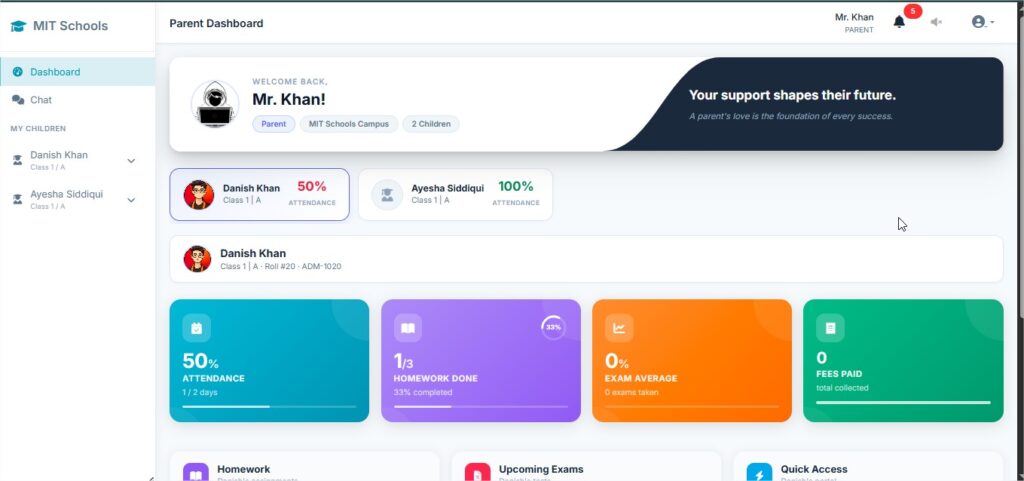
A parent portal is one of the most valuable parts of a school management application because it connects the school directly with families.
Parents do not need access to every administrative function. They need timely, accurate, and understandable information about their child.
A parent portal or parent mobile app may allow families to view attendance, examination results, fee status, school announcements, homework, timetable details, and teacher messages.
Common Parent Portal Features
Introduce the most useful functions parents typically expect from a modern school management application.
A useful parent portal can include:
- Attendance notifications and absence history.
- Fee invoices, vouchers, reminders, and payment records.
- Examination results, grades, report cards, and teacher remarks.
- School notices, event calendars, holidays, and announcements.
- Homework, assignments, and class updates.
- Secure communication with teachers or the school office.
- Push notifications, SMS, or WhatsApp alerts where supported.
- Multiple-child access for parents with more than one child in the school.
The quality of the parent experience matters.
A portal should not overwhelm families with technical terminology or unnecessary screens. It should present important information clearly and work reliably on commonly used smartphones.
Schools should also provide onboarding instructions for parents who are less familiar with digital platforms.
Key Features to Look for in Mentor Quill School Management Software in Pakistan
Provide a practical checklist for schools evaluating Mentor Quill or other school management software providers.
Student Information Management
The platform should store student profiles, guardian information, admission records, documents, class assignments, sections, and academic history.
It should offer search, filtering, import, export, and controlled editing capabilities.
Fee Management and Online Collection
A strong fee module should support fee structures, discounts, scholarships, invoices, vouchers, receipts, arrears, reminders, and payment history.
Schools should ask whether the system can handle different fee categories, late charges, multiple campuses, and their preferred payment process.
Attendance and Biometric Integration
The system should make it easy for teachers to record attendance and administrators to review attendance trends.
Some institutions may also need integration with biometric devices or attendance machines.
Before purchasing, schools should confirm which hardware models and data formats are supported.
Examination and Result Management
The software should allow schools to configure assessment types, subjects, grading rules, report cards, positions, remarks, and examination schedules.
It should produce accurate reports and allow authorized staff to correct mistakes through an audit-friendly process.
Communication and Notifications
Look for announcements, internal messages, email, SMS, push notifications, and WhatsApp support where appropriate.
A communication feature should include user permissions so that sensitive student information is not shared with the wrong audience.
Cloud Security and Backups
Schools should ask where data is hosted, how backups are handled, how user access is protected, and what happens if an employee leaves the school.
Cloud hosting does not eliminate the need for good security practices.
Schools should use strong passwords, role-based permissions, two-factor authentication where available, and regular reviews of active accounts.
Reports and Dashboards
Administrators need reports that help them make decisions.
Useful reports may cover enrollment, attendance, fee collection, outstanding balances, examination performance, teacher activity, and campus comparisons.
The best dashboard is not the one with the most charts. It is the one that presents actionable information clearly.
Benefits of Using a School Management Application
Improved Organization
A centralized system reduces the need to search through multiple registers, spreadsheets, and chat conversations.
Staff can find records more quickly and use consistent information across departments.
Improved Operational Efficiency
Automated fee reminders, attendance summaries, result calculations, report generation, and notifications can reduce repetitive work.
This allows school teams to spend more time on teaching quality, student support, and parent service.
Better Communication
With a student portal, teacher portal, and parent portal, each user receives information relevant to their role.
Parents can stay informed, teachers can coordinate with administrators, and students can track their academic responsibilities.
Better Decision-Making
School leaders can use attendance, fee, enrollment, and academic reports to identify trends.
For example, a decline in attendance may require a pastoral intervention, while repeated fee delays may indicate the need for a clearer reminder process or payment plan.
How Much Does Mentor Quill School Management Software Cost in Pakistan?
Target the commercial keyword around Mentor Quill pricing while explaining why software pricing varies according to school requirements.
The Mentor Quill school management software price in Pakistan depends on several factors, including the number of students, number of campuses, modules, mobile applications, integrations, customization, support, hosting, and implementation services.
School management software providers may use different pricing models, including free plans for smaller institutions, monthly subscriptions, per-student pricing, annual licenses, or one-time purchase models.
Schools should compare the total cost of ownership rather than focusing only on the monthly fee.
Important questions include:
- Is setup included?
- Is data migration included?
- Is technical support available?
- Are future updates included?
- Are SMS or WhatsApp messages charged separately?
- Is hosting included?
- Can the school export its data if it changes providers?
- Are mobile applications included?
- Are custom integrations charged separately?
How to Choose the Best School Management System in Pakistan
The best school management system in Pakistan is not necessarily the platform with the longest feature list.
It is the system that matches the institution’s size, budget, workflow, technical capacity, and communication needs.
Start by documenting the school’s current problems.
Are fee records difficult to reconcile? Are parents missing attendance updates? Are result cards prepared manually? Are multiple campuses using different processes?
A clear problem list makes it easier to evaluate software objectively.
Next, request a live demonstration.
Ask the provider to show the exact workflows that matter to the school, such as:
- Adding a student.
- Creating a fee voucher.
- Marking attendance.
- Entering examination results.
- Sending a parent notification.
- Generating a report.
- Managing teacher records.
- Managing multiple campuses.
Finally, run a pilot with a small group of administrators, teachers, students, and parents.
Their feedback will reveal whether the application is genuinely easy to use.
A reliable implementation plan should include data migration, user training, permissions, support, backups, and a process for handling errors.
Frequently Asked Questions About Mentor Quill School Management Software
What Is the Difference Between School Management Software and School ERP Software?
Answer:
School management software usually refers to tools for student records, attendance, fees, exams, communication, and daily school administration.
School ERP software may offer a broader set of integrated functions, including finance, human resources, procurement, inventory, transport, and multi-campus operations.
In practice, the terms overlap, so schools should compare the actual modules and capabilities rather than relying only on the product label.
Mentor Quill can provide both school management and broader ERP-style solutions depending on the institution’s requirements.
Can Small Schools Use an Online School Management System?
Answer:
Yes.
Many cloud-based systems are designed for small schools, academies, and coaching centers as well as larger institutions.
Small schools should choose a plan that matches their student numbers and avoid paying for complex modules they will not use.
Do Parents Need a Separate Application?
Answer:
Not always.
Some providers offer a browser-based parent portal, while others provide a dedicated mobile application.
A separate app can offer push notifications and a more convenient mobile experience, but the most important factor is whether parents can access accurate information easily and securely.
Mentor Quill can serve parents through both web-based and mobile access, depending on the selected solution.
Can Mentor Quill School Management Software Support Multiple Campuses?
Answer:
Many modern platforms support multi-campus or multi-branch management.
Before selecting a system, confirm whether campuses can maintain separate fee structures, classes, users, reports, and permissions while still allowing authorized owners or administrators to view consolidated information.
Mentor Quill can be positioned as a suitable solution for institutions that require centralized management across multiple campuses.
Is Mentor Quill School Management Software Available in Urdu?
Some Pakistan-focused systems and educational resources provide Urdu or bilingual interfaces, reports, notices, and guides.
Schools should ask the provider which parts of the system support Urdu, including student names, report cards, invoices, parent messages, and printed documents.
If Urdu support is important to the institution, it should be confirmed during the product demonstration before implementation.
Conclusion
Summarize the main value proposition and reinforce Mentor Quill as a practical school management solution for Pakistani educational institutions.
A well-designed Mentor Quill school management software and application in Pakistan can connect the daily work of administrators, teachers, students, and parents.
The student portal supports academic visibility, the teacher portal reduces paperwork, and the parent portal improves communication and trust.
Behind these portals, the school benefits from centralized records, better fee management, more efficient attendance tracking, organized examination processes, and clearer reporting.
The right system should be selected according to the school’s actual needs.
Schools should evaluate usability, mobile access, security, support, integrations, pricing, data ownership, and implementation—not just the number of advertised features.
With a thoughtful rollout and proper staff training, a school management application can become a practical foundation for more efficient and transparent education management in Pakistan.